How to open Publisher files without Publisher, after October 2026
Publisher stopped working, or went missing from your Microsoft 365 (Office 365)? Your .pub files still open without it. Newsletters, flyers, church bulletins, invoices: if you made them with Microsoft Publisher, they are saved as .pub files. Here is how to open them now, how to change their text, and how to save them as PDF or Word.
Publisher says "Unlicensed Product", opens files in view mode only, or greys out Save As and Export
Microsoft explains what changed on its own page, "Microsoft Publisher will no longer be supported after October 2026". In its words: "Microsoft 365 subscribers will no longer be able to open or edit Publisher files in Publisher." For Publisher bought once, its page says: "If you have the Perpetual version of Publisher, you will still be able to access and edit your files."
Your .pub files are still where you saved them, on your PC or in OneDrive. On Microsoft 365, an Office update removes Publisher from each PC. Microsoft's notice to admins says it starts in mid-November 2026, and in early December 2026 on the Monthly Enterprise Channel that some businesses use. Until the update reaches your PC, Publisher may still open, so convert the files you want to keep. After it, you need another program to open them. Here are two ways: one free, one ours.
The free way: LibreOffice Draw
LibreOffice is a free office suite. Its drawing program, Draw, opens .pub files.
- Install LibreOffice from libreoffice.org.
- Start LibreOffice Draw and open your .pub file with File > Open.
- Look through the pages, then export the file as a PDF from the File menu.
For a folder full of .pub files, LibreOffice can also make the PDFs from the command line. In File Explorer, open that folder, click the address bar, type cmd and press Enter. In the window that opens, paste this line and press Enter:
"C:\Program Files\LibreOffice\program\soffice.exe" --headless --convert-to pdf *.pub
It makes one PDF for each .pub file, in the same folder.
Our app: PUB Viewer by Northgable
PUB Viewer by Northgable is a Windows app from the Microsoft Store.
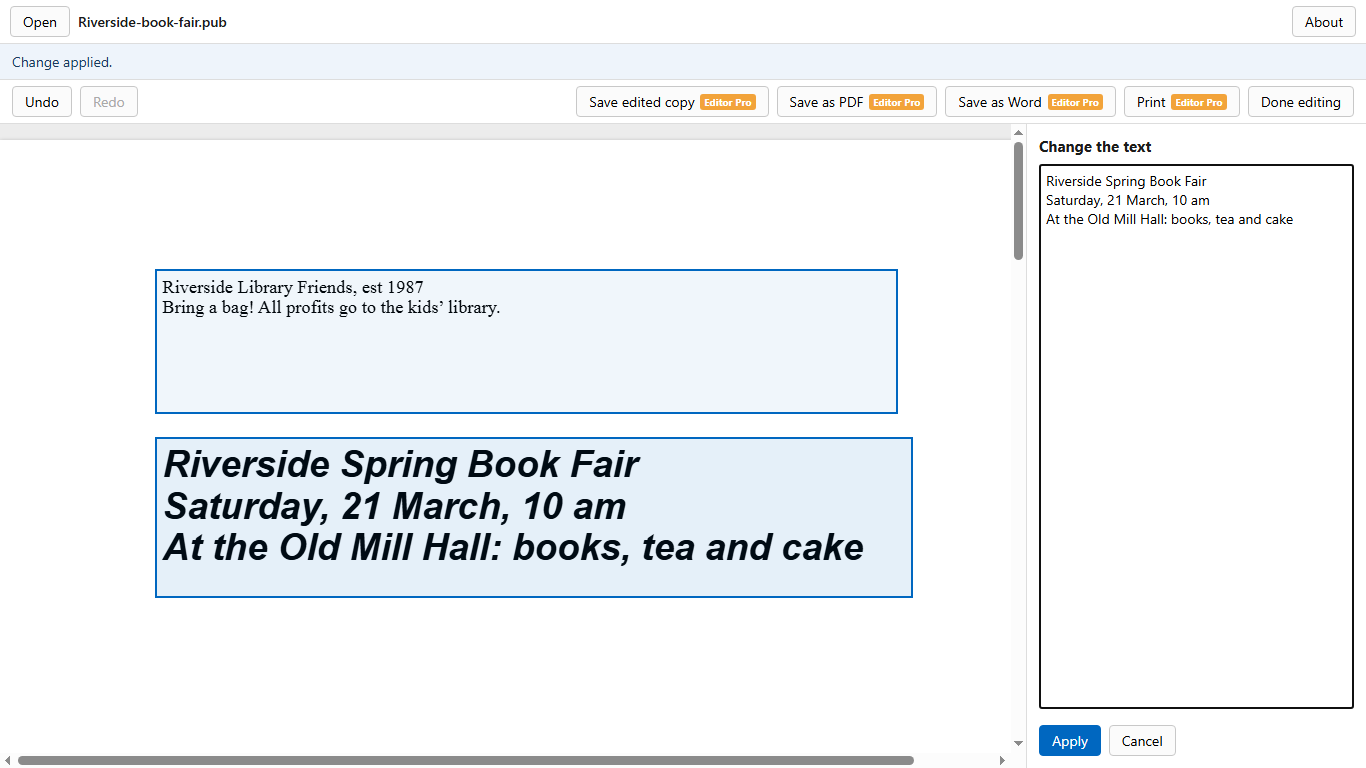
- Free: open .pub files, see every page and zoom in.
- Edit text: click a text box and type. Editing is free to try; saving, printing or exporting an edited file needs Editor Pro (one payment, USD 29.99 in the US), which includes everything in Pro. Your .pub file is never changed: you save an editable copy (.odg), a PDF or a Word file. Pictures, table cells and turned text can't be changed yet.
- Pro, one payment (USD 14.99 in the US): save as PDF, PNG or an editable Word document, convert a whole folder to PDFs, and print.
- Works offline: your files never leave your PC.
It opens .pub files made with Microsoft Publisher 2000 and later, including Microsoft 365. Files from Publisher 98 or earlier aren't supported and may not open.
Get PUB Viewer by Northgable from the Microsoft Store: https://apps.microsoft.com/detail/9MVMT1R8XT7H?cid=mk-page-pub
Convert many Publisher files to PDF at once
If you have dozens or hundreds of .pub files:
- LibreOffice: the command line above makes a PDF of every .pub file in a folder.
- PUB Viewer by Northgable (Pro): choose Convert a folder and pick the folder once. Every .pub file in it becomes a PDF next to it, from one window, with no commands to type. (Files in sub-folders are not included; convert each folder in turn.)
Microsoft's own page also offers a conversion script. In its words, it needs this first: "Ensure you have a working and licensed version of Publisher installed on your computer."
Questions?
Our help page for the app answers the common ones.
Something not working, for example a file that won't open or a purchase that didn't unlock? Write to kestrelworksdev+northgable@gmail.com. We answer every message. Ideas and praise: a review on the app's store page helps others find it.
PUB Viewer by Northgable is made by Northgable (disclosure: this page is about our own app). Not made by or affiliated with Microsoft. Microsoft Publisher and Microsoft Word are trademarks of the Microsoft group of companies. LibreOffice is a registered trademark of The Document Foundation. Updated 19 November 2026.
About this site
Run by Northgable, the maker of the app on this page. E-mail: kestrelworksdev+northgable@gmail.com. Privacy: this site has no ads, no cookies of its own and no forms, and no account or sign-in. Cloudflare Web Analytics counts page visits without cookies and without identifying you. Cloudflare, which hosts it, handles each request under its own privacy policy: https://www.cloudflare.com/privacypolicy/ The links to our apps in the Microsoft Store and on Google Play carry a campaign tag, so the store can show us how many people came from this site. We see only the totals the stores show to app makers, never who you are. If you e-mail us, we use your message only to answer you. Ask us to delete it and we will. If this changes, this section changes first.